

3. ClickUp — The All-in-One Project Powerhouse
ClickUp integrates project scheduling, collaboration, and performance tracking in one platform. With multiple view options — Timeline, Gantt, Kanban (Board), and Timesheets
— it delivers versatility for different project management styles.
At I-BACUS Tech, ClickUp was adopted to simulate production and marketing workflows. For example, in our garment production workflow project, tasks like 'Design Approval', 'Fabric Procurement', 'Cutting & Stitching', and 'Ǫuality Check' were tracked in the Timeline and Gantt views. This gave our team complete visibility into dependencies, workload balance,andoverlappingphases. The Timesheet view also proved useful for measuring actual hours spent versus planned hours — valuable for analyzing team productivity and billing accuracy.
ClickUp Project Management: Features and Real-Time Use Cases at I-BACUS-TECH
In today’s fast-paced digital environment, effective project management is essential to maintain productivity and collaboration across teams. ClickUp serves as an all-in-one project management and productivity platform that empowers teams to organize work, track tasks, and visualize progress through its dynamic features.
At I-BACUS-TECH (IBT), ClickUp plays a pivotal role in managing software development, client projects, and training operations efficiently. Let’s explore its key features and how IBT leverages them in real-world scenarios.
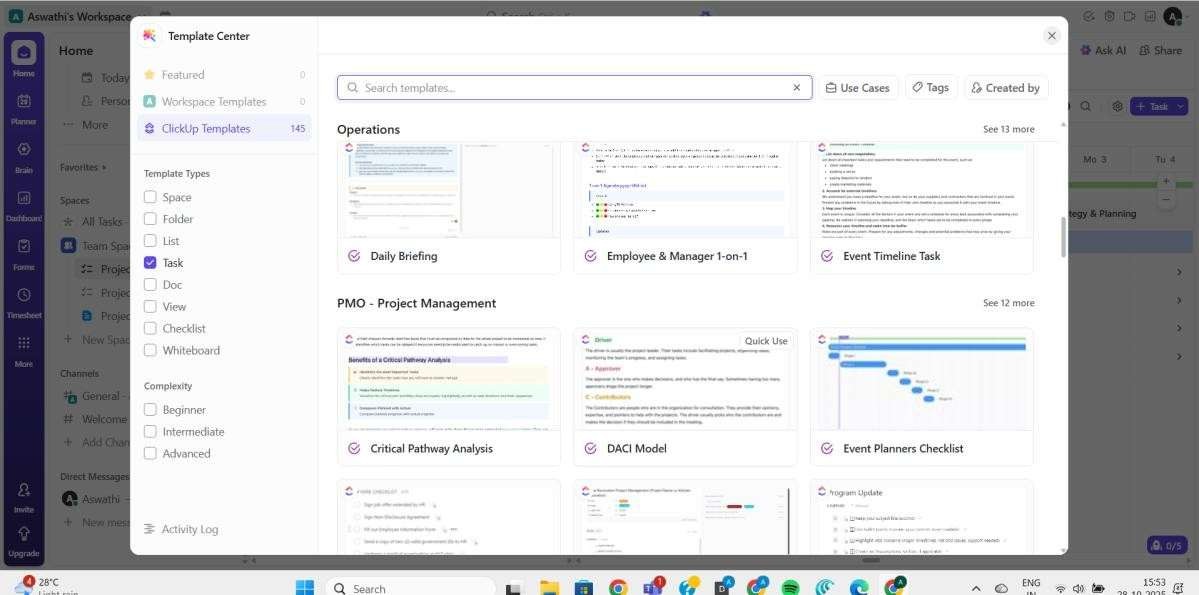
Template Center and Task Creation
ClickUp’s Template Center provides a quick way to set up new projects using pre-built templates like Project Management, Event Timeline, or Operations Management. Each task can be customized with due dates, assignees, and priority levels, ensuring clarity and accountability from the start.
IBT Example:
When IBT begins a new client dashboard project, the team uses a custom project management template that automatically creates task lists for design, development, testing, and deployment. Each phase is assigned to respective teams with predefined checklists — saving setup time and standardizing project workflows.
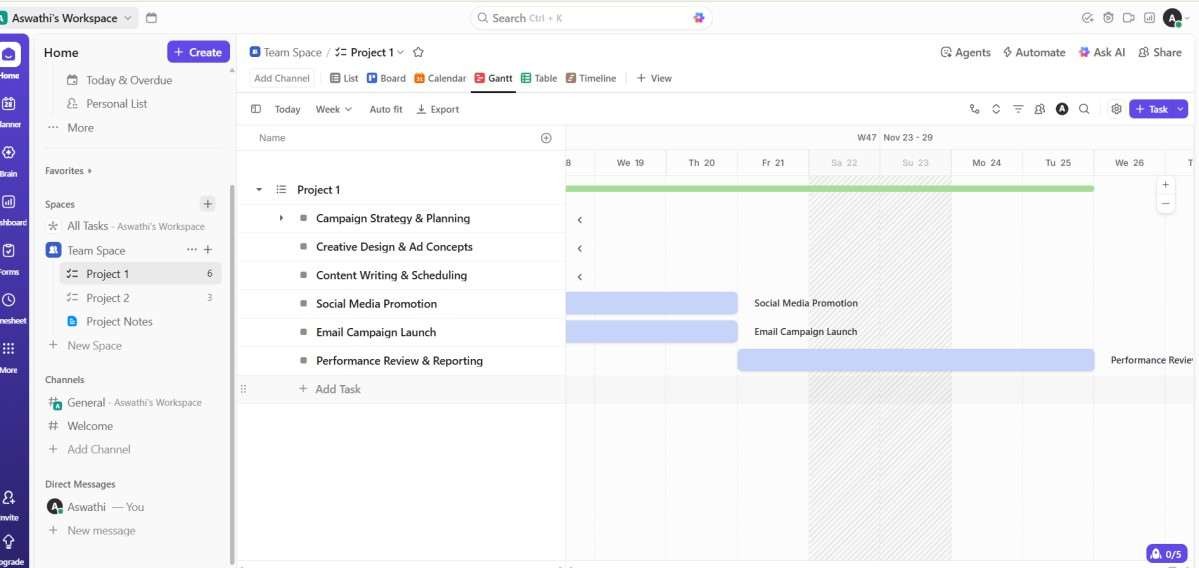
Gantt Chart View
The Gantt Chart View visualizes the entire project timeline — showing task durations, dependencies, and milestones. It’s ideal for identifying overlaps and ensuring deadlines are met.
IBT Use Case:
For a Power BI dashboard implementation, the Gantt Chart helps IBT’s development team align frontend work with backend API integration. If the data integration task gets delayed, ClickUp automatically adjusts dependent tasks, keeping the team aligned with realistic deadlines.
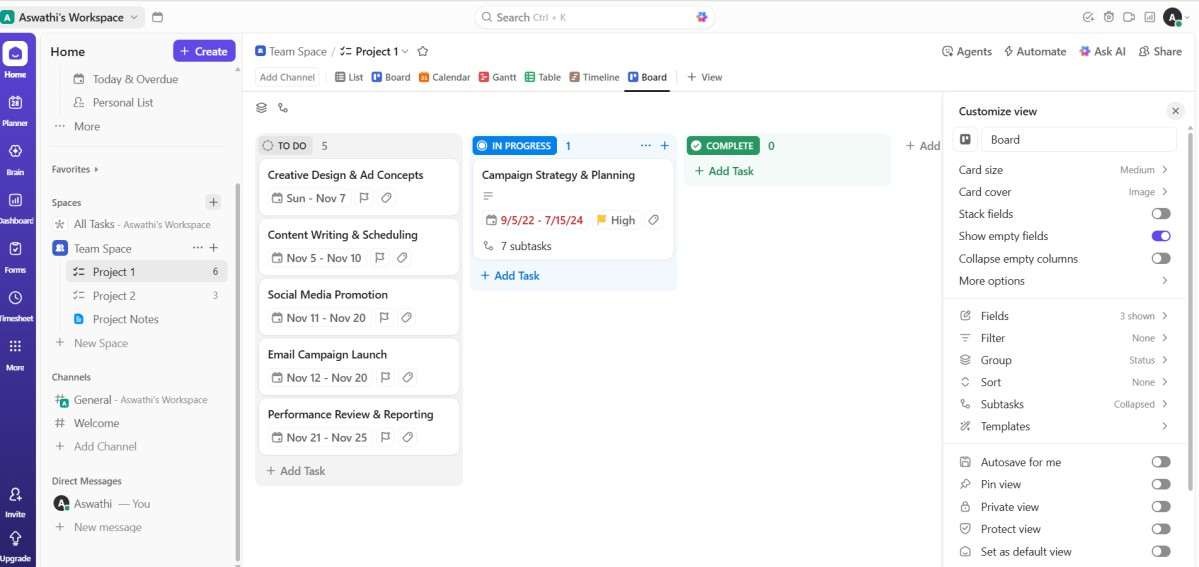
Kanban (Board) View
The Kanban (Board) View provides an agile-friendly layout where tasks move visually across columns — To Do, In Progress, and Completed. This setup encourages collaboration and real-time progress updates.
IBT Use Case:
In IBT’s training division, the Board View helps track multiple college workshop schedules. Each card represents a college event (e.g., Power BI Workshop at Nehru College), and team members update progress as they finalize presentations, materials, and attendance reports. This approach ensures that training sessions are coordinated seamlessly.
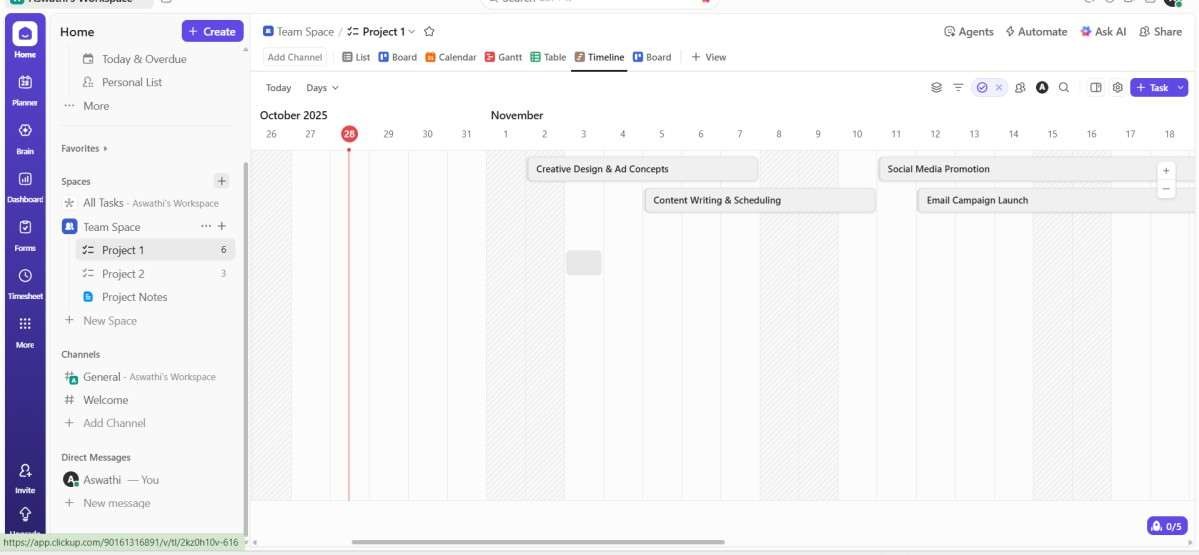
Timeline View
The Timeline View offers a linear visualization of project activities, enabling teams to monitor start and end dates for each task and manage overlapping schedules effectively.
IBT Example:
During the launch of an internal analytics product, IBT used the Timeline View to align parallel workstreams — development, marketing content creation, and client demo setup
— ensuring that all teams completed their contributions before the go-live date.
Timesheets and Productivity Tracking
ClickUp’s Timesheet feature allows users to log time spent on each task, offering transparency in performance tracking and resource management. This is particularly valuable for analyzing planned vs. actual effort.
IBT Use Case:
When IBT’s development team worked on the Good Foods web application, each developer logged their task time daily. This data helped the project manager identify where additional support was needed and accurately forecast timelines for upcoming releases.
ClickUp empowers I-BACUS-TECH to manage projects with precision — from software development and client implementations to training programs and internal operations. By combining Gantt, Timeline, and Board Views with Timesheet tracking, IBT ensures that every project stays on schedule, teams collaborate efficiently, and performance insights guidefutureimprovements.
Whether it’s executing a data analytics project or coordinating multi-day training events, ClickUp acts as IBT’s unified workspace for smarter, faster, and more transparent project management.
to be continued…..